1 / 3
Caption Text
2 / 3
Caption Two
3 / 3
Caption Three margin testing

Wednesday, March 24, 2010

50 Places Running Linux That You Might Not Expect

[H]ard|OCP - 50 Places Running Linux That You Might Not Expect

Focus has posted a really interesting list of 50 places running Linux. Some of the companies and places on the list are obvious but others just may surprise you.

Linux is hovering just beneath 1% of the overall market share in operating systems. And although that might sound like a small number, Linux is far more than just a fringe OS. In fact, it's running in quite a few more places than you probably suspect. Below are fifty places Linux is running today in place of Windows or Mac.

Tuesday, March 23, 2010

Google搜索服务退出中国

Google搜索服务退出中国-月光博客

  Google高级副总裁大卫德鲁蒙德今天在Google官方网站发布博文"新的中国策略(更新)",指出中国的互联网环境在去年一年的时间内持续恶化,大量知名网站和服务,例如 Facebook、Twitter、YouTube、Google Docs 和 Blogger 等网站都被封锁,这所有的一切让 Google 决定停止在 Google.cn 过滤审查搜索结果。

  Google在博文中指出,Google将从今天开始停止对Google.cn的网页搜索、新闻搜索、图片搜索的审查过滤,访问Google.cn的用户将会被自动重定向到Google.com.hk,在那里将提供没有审查的简体中文搜索服务。香港用户的繁体中文搜索服务保持不变。中国大陆用户将使用香港的服务器进行搜索,因此可能会出现访问速度变慢或暂时无法访问的情况。

  Google做出这样的决定是艰难的,Google希望包括中国人在内的全世界人民都能享受到Google的服务,但Google在和中国政府的谈判中得到明确的信息是,没有审查过滤的搜索是违法的,因此Google相信通过使用Google.com.hk来提供没有审查过滤的搜索结果是一个明智的选择,因为这种服务在香港那是完全合法的,同时还能帮助中国大陆的网民获取更多信息。Google很清楚这可能意味着搜索服务随时有被封锁的可能,但Google希望中国政府会尊重Google的这个决定。此外Google还创建了一个每天都更新的网页来检测中国大陆访问Google各个服务的情况。

  由于Google有着广泛的业务,因此原先谷歌中国的研发和销售团队还将继续留在中国工作,销售团队会有人专门负责中国用户访问Google.com.hk的情况。

  Google在博文的最后写道,Google明确指出,所有的这些决定的推动均是由美国的管理人员执行的,与谷歌中国员工无关,中国的员工不应该被追究责任,Google中国员工面对着大量的压力依然努力保证了谷歌中国的各项服务正常运转,Google对此深感骄傲。

  在以上声明发布之后,我这里检测,直接访问 www.google.cn 已经会自动跳转到了 www.google.com.hk ,首页提示:"欢迎您来到谷歌搜索在中国的新家"。这表明Google已经真的要放弃了google.cn了,谷歌中文搜索服务终于撤出中国,除此之外,谷歌音乐、谷歌热榜、igoogle等google.cn的服务还依旧能在中国访问。

  见证历史的时刻到来了,今天,我们一起见证了,全球最伟大的科技公司Google,第一次将其搜索服务撤离一个国家,这不仅仅是中国网民的悲哀,更是中国人的耻辱,这一天具有划时代的历史意义:中国在全球高速发展的互联网科技革命的历史时期,向着闭关锁国的道路迈上了坚定的一步。

Thursday, March 18, 2010

Google and Linux are coming to your TV

Google and Linux are coming to your TV - Computerworld Blogs

In what may have been Google's worst kept secret in years, Google, along with its partners, Intel, Logitech and Sony, is on its way to delivering the Web to your television. What will they be using to do this? Why, they'll be using Google's Android Linux, of course.

Android is an embedded Linux that Google has already been deploying in phones like its own Nexus One and Motorola's Devour and Droid. But Android has always been more than just a smartphone operating system; it's also been used in netbooks and other devices. So taking it to a TV set-top box was an easy move for Google and its hardware friends.

In fact, Linux has long been a part of the TV set-top box scene. TiVo, one of the first and some would argue still the best DVR (digital video recorder) uses Linux. Many other DVRs and TV set-top boxes use it as well.

With Google TV, Google will likely be supplying Android as well as Web content from both outside video sources and its own, such as YouTube. Here, we don't know what's Google is up to, but I would be a very happy guy if they'd let me get to Hulu, Netflix, and Revision 3 on my television.

Intel will be supplying the chipsets for the Google TV set-tops, and Sony is expected to be including Google TV functionality in some of its televisions. Sony is no stranger to building Internet TV into its TVs. Several of the Sony Bravia line, for instance, already works with Amazon Video on Demand. Logitech, everyone's favorite mouse manufacturer, will be building the remote controls and keyboards for Google TV. As a long-time fan of Logitech's high-end Harmony Remotes, I think this was a smart move.

In addition to watching Internet TV with a Google TV setup, you'll be able to use your television as a monitor. Unlike the bad old days of early home computing, when using a TV as a monitor was a painful necessity, the Google TV's Android interface is being customized so that it will it provide a pleasant experience for today's high-end HDTV owners.

Today, while you can directly feed Internet or local video from your server to your TV, it's not easy. Programs like Boxee and devices like Apple TV can help, but you still need to be something of a computer and a TV expert to get Internet TV to work consistently well on your television.

I should know. I've been working with my Apple TV since the day it came out. But even now, getting video content that doesn't come from the iTunes Store into an Apple TV knowledge of video transcoding. A simple, easy-to-use, Linux-powered Google TV device may be just what's needed to take Internet TV from being a hobby to being the way many of us watch our TVs.

Wednesday, March 17, 2010

Geeks save the planet

Print Story - canada.com network
Jennifer Moreau
Burnaby Now
Wednesday, March 17, 2010

A band of geeks is descending on Burnaby's McGill library branch to show locals how they can get their hands on cheap computers, while protecting the environment from toxic waste.

Free Geek Vancouver is a nonprofit group that recycles computers and teaches people with absolutely no tech experience how to refurbish old computers.

The idea is to reduce e-waste while protecting the environment from the hazardous materials often found in old computers. The rebuilt computers are installed with open-source software. Volunteers can exchange a rebuilt computer for 24 hours of work or buy one, starting at $25.

The upcoming session at McGill will review Free Geek Vancouver's work. While some computer recycling organizations ship their waste overseas, Free Geek Vancouver is the only one in B.C. that has earned e-Stewards Certification, which outlines a strict set of guidelines for sustainable and socially just electronics recycling.

The McGill session is Monday, March 22, at 7 p.m. It's free, but because space is limited, you should register online at www.bpl.bc.ca or call 604-299-8955. The McGill library branch is at 4595 Albert St.

Tuesday, March 16, 2010

Google launches Nexus One in Canada

CBC News - Technology & Science - Google launches Nexus One in Canada
By Peter Nowak, CBC News
The Nexus One has sold poorly in the United States, according to a mobile analytics firm.
(Manu Fernandez/Associated Press)

Hot on the heels of poor sales estimates in the United States, Google is launching its Nexus One "super" phone in Canada.

The company announced that as of Tuesday, Canadians can order the Nexus One from its website. Google is bucking convention with the Nexus One by selling the phone unlocked, which means it can work on any compatible network, and for its full price of $529 US. The phone isn't locked to a specific provider and doesn't carry any term contract.

Phones in North America are typically sold locked so that they only work on a given provider's network, and usually at a discount in exchange for a multi-year contract. Google, however, is trying to spur competition with the Nexus One by giving consumers ownership over their phones and thereby the power to demand deals from their providers.

In a blog post, Google explained that Canadians can buy one of two versions of the Nexus One, each of which work on different 3G cellular frequencies. The version introduced in the United States in January works on Wind Mobile's network in Canada and on T-Mobile's U.S. network. The new version introduced on Tuesday works on AT&T's network in the United States and on Rogers in Canada.

A spokesperson for Google Canada could not say whether either version would work on Bell or Telus networks. She also could not say why the company chose to make two separate phones rather than one that works on both types of 3G frequencies.

"It's an ongoing project to extend the availability around the world," she said. "We'll continue to launch more phones that work on different networks and providers."

The Canadian announcement comes on the same day that U.S.-based mobile analytics firm Flurry declared the Nexus One a flop. The company estimated that Google had sold only 135,000 phones in its first 74 days, or the same length of time it took Apple to sell one million iPhones. Analysts did note, however, that the comparison was not necessarily fair, given Google's unusual business model for selling the Nexus One.

The company hyped the device as a "super phone" when it launched in January because of its powerful processing ability.

Google also announced that paid apps for phones using its Android operating system are now available in Canada.

Monday, March 15, 2010

Graphical vi-vim Cheat Sheet and Tutorial

Graphical vi-vim Cheat Sheet and Tutorial

Learning vi or vim is not easy. But it doesn't have to be that difficult, either. It is, in any case, faster, more powerful, and more productive than editing with any other editor, so you would do very well in investing the time and effort to learn it.

Being a vi lover myself, I came up with the idea of providing a graphical cheat sheet for those learning vi or vim, and I also found out it was a very good way to structure a tutorial. Here are the results for your learning enjoyment (or your colleagues').

By the way, I recently published the definitive article explaining why vi/vim editing is so much better than regular editing. It should prove useful if you want to read it yourself, or if you want to point your skeptical friends to a description of why it makes sense, apart from being an entertaining read: Why, oh why, do those #?@! nutheads use vi?.

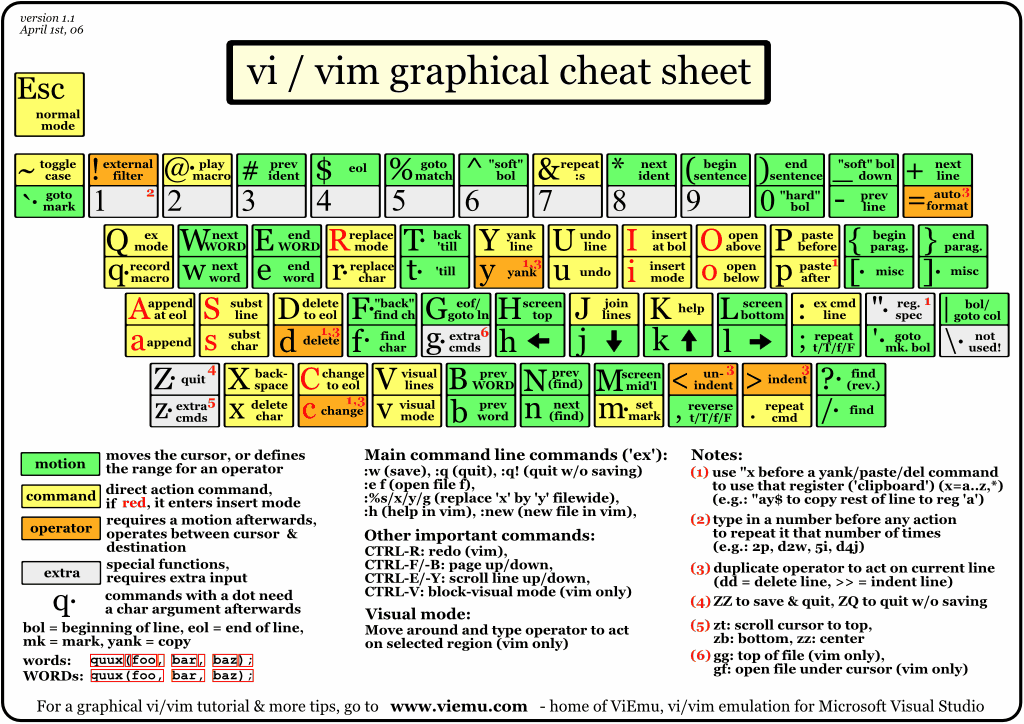
Graphical cheat sheet

This is a single page describing the full vi/vim input model, the function of all keys, and all major features. You can see it as a compressed vi/vim manual. Click on the image below to access the full-size bitmap image, or download the vector-based, scalable SVG version (zip-compressed - and be sure to view & print the SVG with the open source application Inkscape or the Adobe plug-in for Internet Explorer, Firefox breaks the layout for some reason, apart from rendering it with no anti-alias!).


Graphical cheat sheet based tutorial

Lesson 1
Lesson 1 (hi)
Lesson 2
Lesson 2 (hi)
Lesson 3
Lesson 3 (hi)
Lesson 4
Lesson 4 (hi)
Lesson 5
Lesson 5 (hi)
Lesson 6
Lesson 6 (hi)
Lesson 7
Lesson 7 (hi)
Zip with all GIFs
Zip with all SVGs

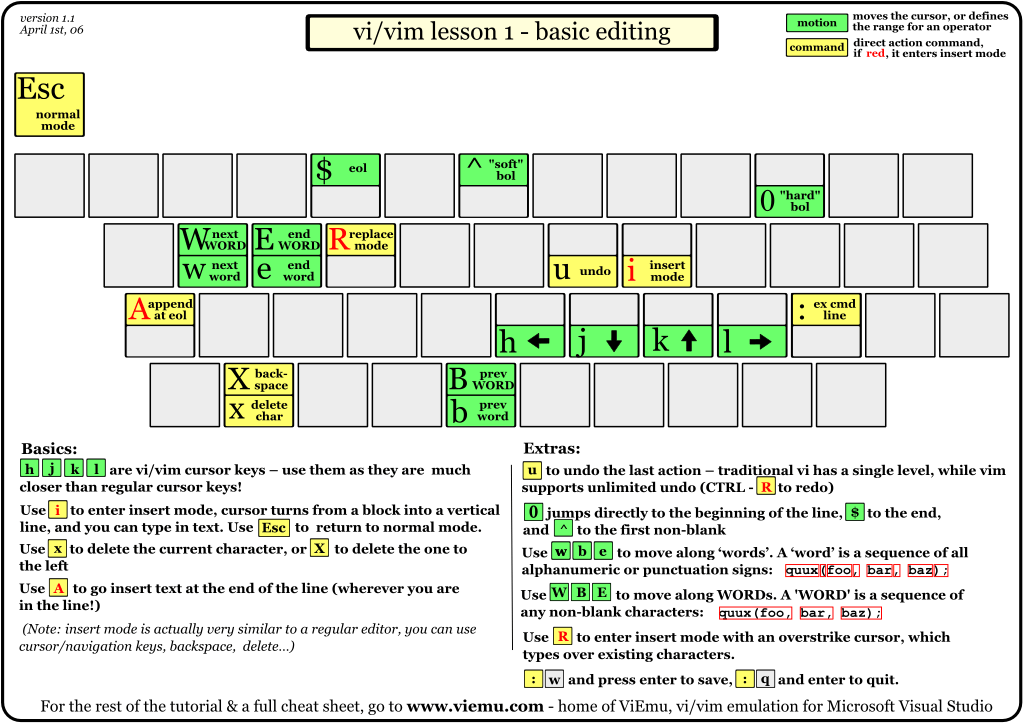
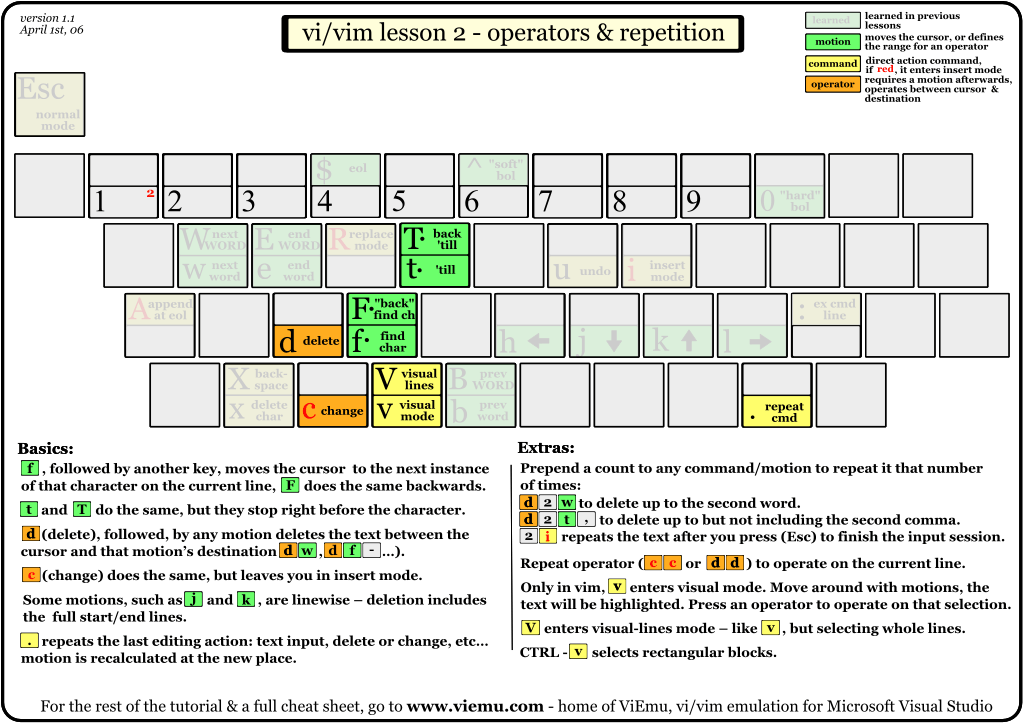
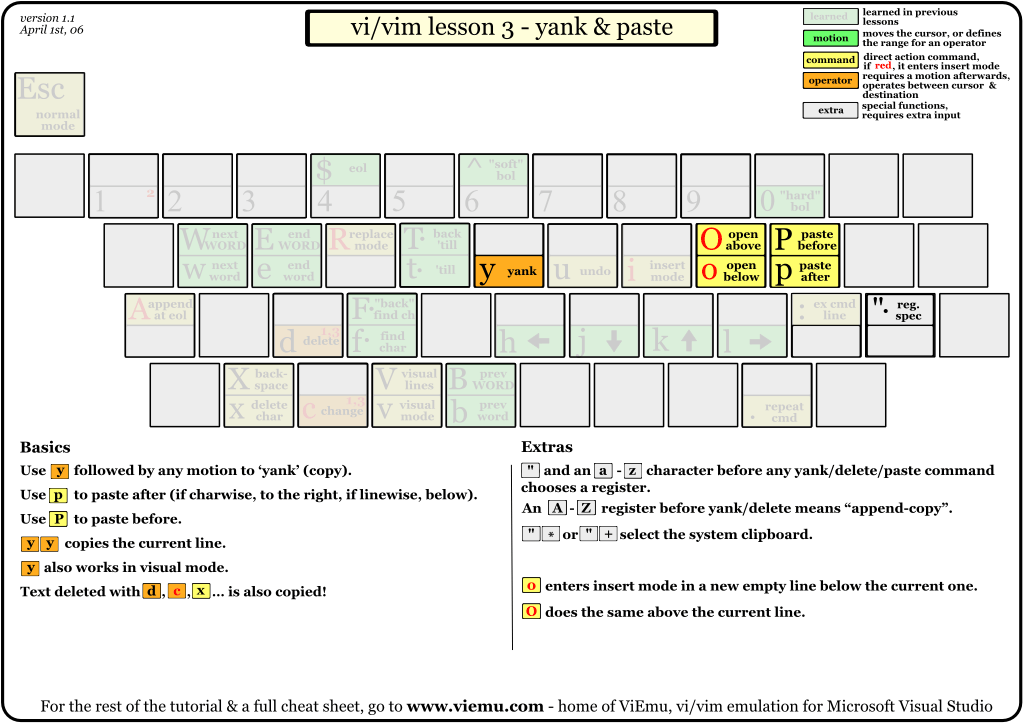
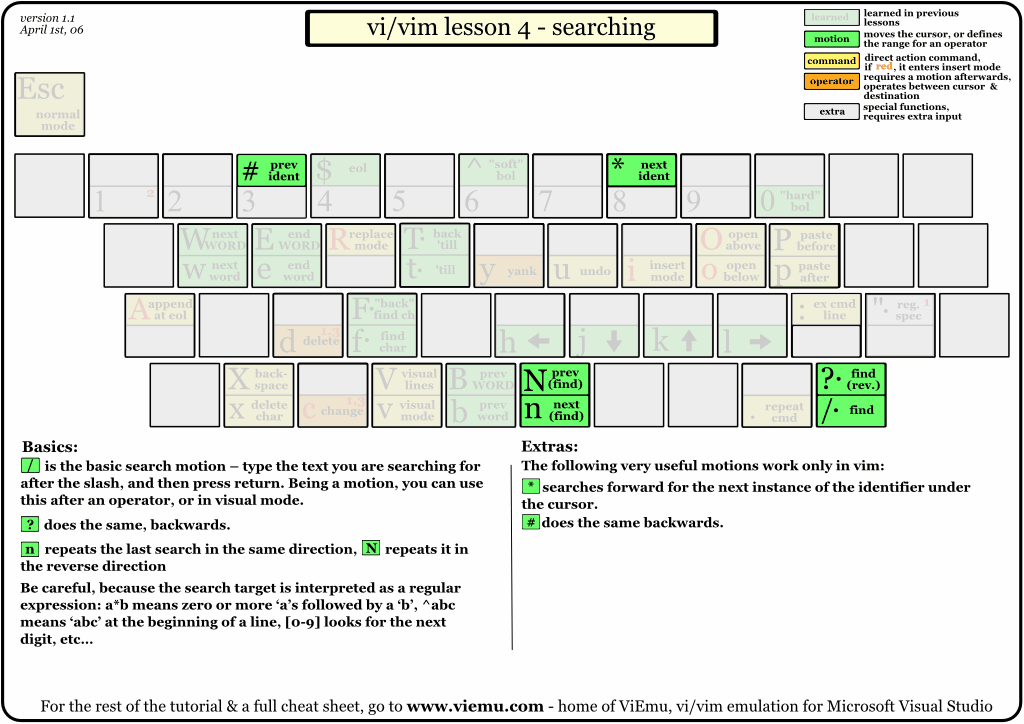
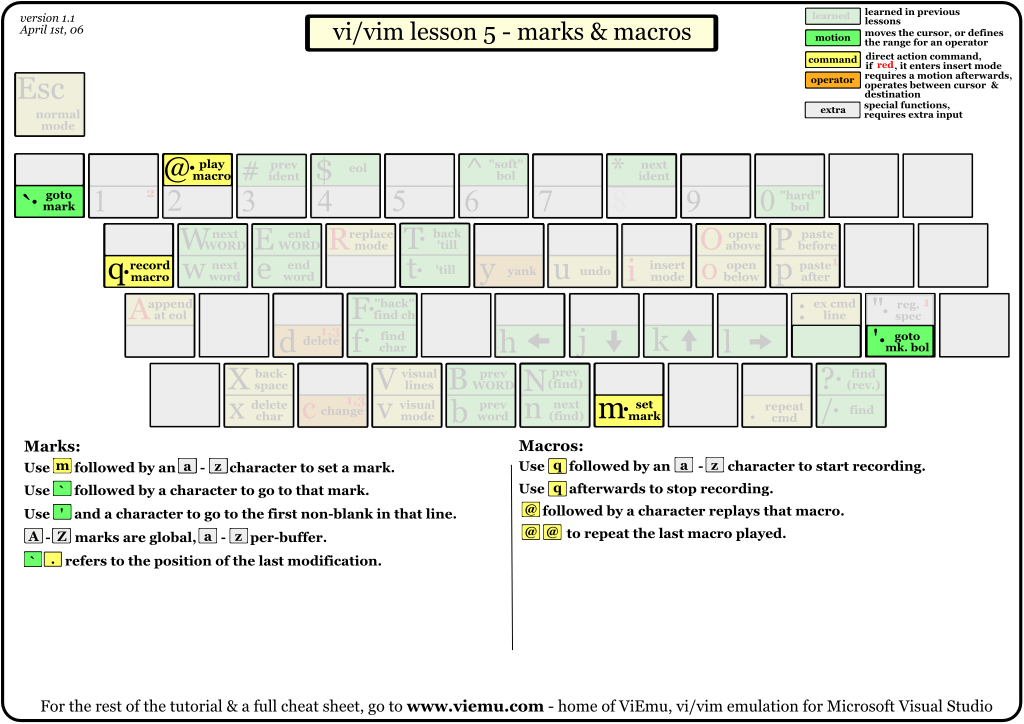
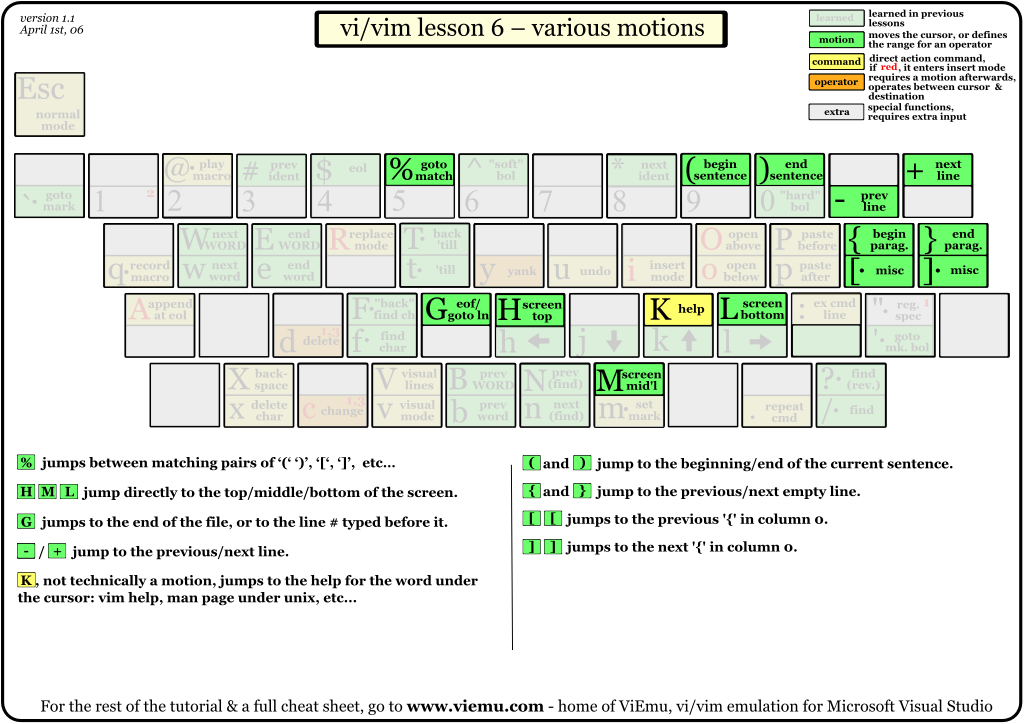
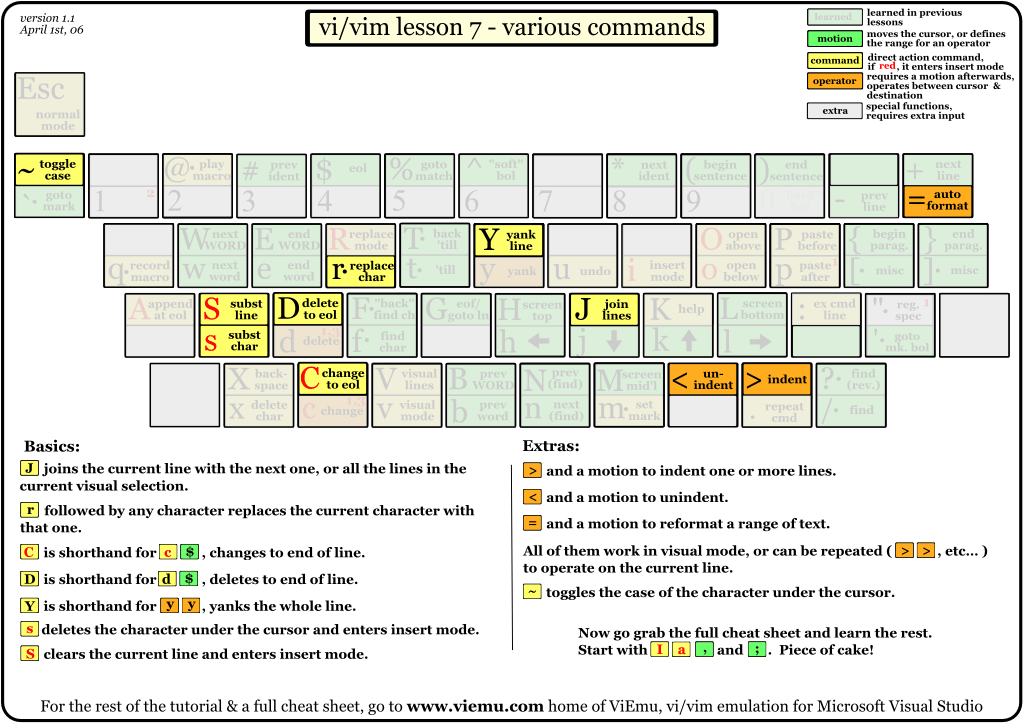
The tutorial above is structured in 7 lessons that cover the major commands in vi/vim. They are structured so that you will learn the simplest and most useful first, and the more advanced ones afterwards. Actually, using just the commands shown in lesson 1, you can already start editing in vi/vim in a similar way to how you would on a regular editor. Lesson 2 introduces the very powerful, and vi/vim-exclusive operators, and the rest of the lessons advance from there. Each thumbnail links to a high-resolution bitmap version. You can also download the full tutorial in a single zip file with all the bitmaps or a single zip file with all the SVGs (see the note above about incorrect rendering on Firefox).

Notes

vim is an incredible editor by Bram Moolenaar, based on the original vi by Bill Joy, adding a ton of improvements over it. Nowadays, you should choose vim over vi every time you can.

The cheat sheet and tutorial cover most important functions of vi's input model, leaving out the more advanced regular expressions/ex command line material. This should be a very good beginning to becoming a vi/vim wizard.

With the single exception of the external filter feature ("!"), all functions shown are supported by ViEmu, my commercial add-in that provides advanced vi-vim emulation in Visual Studio.

Relevant links

This cheat sheet has proven to be pretty popular. Here are some relevant links:

And of course, the article detailing why vi/vim editing is 'the killerest':

Google unveils app store for business - Sent using Google Toolbar

Google unveils app store for business

Google has launched an online store dedicated to business applications, adding its voice to the growing clamor for the adoption of cloud computing.

According to Cnet, Google is bringing the app store concept to business cloud computing, giving software developers a storefront for Google Apps customers. The store will act as a platform through which third-party developers can offer business services such as VoIP communication and network monitoring.

It is hoped that organisations will use the service to find and purchase cloud software tools, while developers will be given access to a customer base expected to be 25 million-strong.

"The Web works best when everyone uses 'best of breed' tools and connects them using open standards", said David Glazer, a Google engineering director.

Developers will have to pay a one-time $100 fee to list their applications in the store, and Google will get a 20 percent cut of all applications sold through the store

By promoting cloud computing services to companies, Google expects to generate more income beyond its search engine advertising. The company's revenue from non-advertising operations topped $762 million last year, up by more than 400% from $181 million in 2007.

Despite online initiatives, rival Microsoft is still banking on individual computer licenses of its Windows operating system and software programs.

Google's next step is expected to be a Chrome OS that won't need to operate on a hard drive- functioning on Internet access and cloud-computing services.

Featured Post

Windows和Ubuntu双系统完全独立的安装方法

http://www.ubuntuhome.com/windows-and-ubuntu-install.html  | Ubuntu Home Posted by Snow on 2012/06/25 安装Windows和Ubuntu双系统时,很多人喜欢先安装windows,然...