


虽然HotNews pro2.4版主题安装使用需知,较详细说明了主题安装方法及注意事项,但可能由于主题功能过于繁杂,还是有很多童鞋在主题安装使用中遇到这样和那样的问题无法解决,经常留言询问解决办法,除一些要求较高的主题功能修改问题,基本我都一一作了回复。之前发过2.3版用户反馈回复记录,但随着主题的升级,有些已不能适应新版的功能,所以这里再次把大家经常遇到的问题,汇总一下,方便查阅。
注:这篇文章不是安装说明,只是零散的问题汇总,一定要仔细阅读主题安装使用需知,还可以参考主题之前版本的使用说明及问题回复反馈记录.该主题是偶自用主题可能有些功能只是个人的喜好,如果你准备个性化主题模板请参考热点新闻2.4版主题模版文件说明,自行研究修改。
另外,也提醒大家遇到问题,如不知问题如何说清楚,截个图应该不是什么难事吧,最起码也留个网址,不然真是爱莫能助了.
提示:如果你对修改模板基本要求一无所知,改动模板时,请在后台主题编辑功能中修改,或者使用Notepad++文本编辑软件,决不能用系统自带的记事本,否则可能会造成错位或乱码。
1.启用主题后提示出错,后台空白。
是由于之前启用的主题可能会自动向functions.php中写入内容,解决方法重新上传主题functions.php模版文件,刷新一下就可以了。
2.修改主题CMS.php及category_h.php模版分类调用ID后,乱码或侧边滑动菜单下出现多余空白。
这是由于保存模版文件时,编码错误造成的,中文模板需保证为UTF-8无BOM编码格式,建议在后台主题编辑功能中修改或者使用Notepad++等文本编辑软件,切记不能用系统自带的记事本编辑主题模版。
3.分类列表文章显示不全
不是显示不全,而是主题自动排除上面已显示的最新文章,这可能是目前唯一具备此功能的分类列表布局的杂志型主题.
4.更新CMS补丁后,分类列表左右为什么是相同的
问题有点好笑,哈.模板中类似array(1,2,3,4)共有两处,数字是调用的分类ID,分别添写不同的ID,可以根据实际适当增减调用数量,不一定就是四个.
5.文章中图片放大效果是怎么实现的,是否支持外链图片
图片放大特效,是通过Auto HighSlide插件实现的,支持外链图片,不要用一些免费图片站点提供的html代码,而是获取图片真实地址后,通过WP编辑插入图片.
本来想把此功能集成到主题中,但是考虑到另需加载JS文件,有些童鞋可能会用不到,会影响页面加载速度,所以放弃.
6.如何在留言中插入图片.
此问题与主题无关,WP本身就支持此功能.插入图片代码格式:
<img src="此处为图片链接地址" />
使用前请按这篇文件中的方法修改程序文件:http://zmingcx.com/fraught-with-the-code.html
7.单篇日志太长,如何实现分页浏览
WordPress已集成日志分页函数,只不过有些主题未加调用函数.HotNews pro主题可以实现日志分页,调用方法:
编辑文章时,切换到HTML代码模式,在准备分页的位置加入<!--nextpage-->即可.
8.友情链接页面的自助申请链接实现方法
安装WordPress自助友情链接插件:auto-blogroll修改版,启用后按教程设置,友情链接页面模板已针对该插件进行了优化.
9.启用图片布局后,如何设置文章显示数量
WordPress后台-设置-阅读-博客页面至多显示中设置显示数量
10.启用主题前最好禁用之前启用的所有插件,主题已集成众多通过插件实现的功能,基本不需要任何插件.
11.首页底部的友情链接, 如何显示图片链接
打开footer.php找到show_images=
后面加上数字1
后面加上数字1
11.关于自动缩略图变形
之前版本主题,采用timthumb.php截图函数截取缩略图,可以实现自动裁剪图片,但缺点很明显,会产生大量裁剪后的缓存图片,并且不支持外链图片,对于使用虚拟主机用户,不是很实用,因为空间有限,流量有限,不是长久之计,感觉很鸡肋,所以就去掉了.目前采用的自动缩略图函数不具备裁剪功能,会造成图片变形,而且无缓存图片,但支持外链,如果你对缩略图要求较高,那就单独制作,然后通过添加自定义栏目调用显示.
另外,用过一款叫WP Thumbnails自动缩略图插件,功能很不错,不过资源占用也很恐怖,启用插件后,会自动把所有外链的图片缓存到本地,如果博文较多而且都有图片,将产生大小不一不计基数的缓存图片.
12.关于随机缩略图重复问题
这是首款具有随机缩略图(占位图)功能的Wordpress主题.总是有童鞋想通过添加更多的随机图片,避免重复显示,这里可以明确地说,不管添加多少随机图片,也还是会重复,不然怎么叫随机缩略图.虽然可以通过修改函数,设定组数减少重复,但麻烦懒得弄了.
13.首页CMS模板顶部的热门标签数量如何修改.
标签数量是根据我自己的博客标签长度设置的,可能有的童鞋标签弄得很长,超出模版宽度,修改方法:
打开header_h.php,在最下面找到&number=12,默认显示12个标签,根据需要修改数字
14.经常有童鞋问我某个功能是如何实现的,不是鸟哥不想教你,而是实现某个功能比较简单,但说起来却很复杂,所以我才把主题模版文件作了一下功能说明,大家还是自己研究一下吧,都是这么学会作主题模版的
15.关于分类图标的一些问题
注:主题默认不显示分类图标,需到当前主题设置中设置为显示
这个问题很纠结,由于童鞋们提的问题,我从未遇到过,也不是很清楚。大致先归纳一下:
(1)图标不显示
大多数是因为,WP程序安装在空间子目中造成的。想办法获取图片真实地址,然后据此把图标文件夹移动到相应的空间目录中,比如图标地址是:
那就在空间根目录中新建一个wp-content文件夹,然后把图标文件夹放进去。
或者打开cat_ico.php,修改/wp-content/caticon/,把前的"/"去掉,变成wp-content/caticon/
(2)点击图标显示404页面
出现这种情况除了与固定链接格式有关,还与使用WIN主机有关。
推荐两种固定链接格式:/%category%/%post_id%.html或者/%postname%.html
如果你使用的是WIN主机,打开cat_ico.php,找到<a href=/category/,在前面加上index.php,变为:<a href=/index.php/category/
(3)最后是别忘了到当前主题设置中,设置显示分类图标,默认不显示。
另外,建议不要用WIN主机来玩Wordpress,无法完全支持。
16.解决因中文截断函数造成的受密码保护的文章也可以看到部分内容的BUG.
具体方法:为受密码保护的文章添加自定义栏目,名称:password_hint,值可以添加一句密码提示语,如:我喜欢什么
17.中文截断有乱码现象
这个问题不是很好回答,也是因为自己未遇到过。
主题目前采用下面的函数进行文字截断:
- <?php echo mb_strimwidth(strip_tags(apply_filters('the_content', $post->post_content)), 0, 200,"..."); ?>
对中文英文截断字数控制非常好,这也是目前大多数中文CMS主题喜欢采用的一种文字截断方法,其它文字截断方法,对中英文混排字数控制偏差较大,会造成截断长度参差不齐,不适合CMS主题。
不过就是个非常好的截断方法,偏偏用到一些童鞋的主机上会出截断最后一个字符乱码现象,大概有两个原因:
一个是你的WP数据编码不正确。对于中文,数据库编码应为:
MySQL 字符集: UTF-8
MySQL 连接校对:utf8_unicode_ci
数据库整理:utf8_general_ci
以上设置有些主机空间已设定,无需更改,如果你的数据库编码不是以上那就悲哀了...
最有可能的原因是,主机空间缺少mb_string extension(Linux主机)及php_mbstring.dll(WIN主机)扩展服务,可以要求空间商打开。
18.自动缩略图显示不完整
这个问题也与主机空间缺少扩展组件(组件名称忘记了..)有关,要求空间商打开或者换掉这个主机。
19.点击底部公告链接显示"对不起!您找的文章可能已删除!"
到WP后台随便修改一下固定链接格式,然后再改回原来的,一般可解决,不行就多改几回。很古怪的方法,不知为什么...
20.段首自动空格问题
这个通过CSS控制的段首空两格功能,有人喜欢有人不喜欢,真是萝卜青菜各有所爱。不喜欢的可以打开style.css查找下面代码然后删除:
- .entry p {
- text-indent:2em;
- }
如果你喜欢段首自动空两格功能,但有时编辑文章回行不想让它出现段首空格,怎么办?简单,按回车键Enter同时按上档shift键,这时的回行段首就不会出现自动空格。
21.侧边最新评论为什么不显示博主留言
该问题自从有这个主题,就有人不停地问,其实这是个很菜的问题。侧边显示最新评论,除了可以表明博客比较火爆之外,另一个功能就是方便博主查看网友留言,并及时作出回应。比如我的站,平时我会抽时间集中回复网友提出的问题,如果显示博主的留言,估计侧边显示的全是我的回复,有必要吗?主题有回复自动邮件提示功能,留言者会知道自己的留言有了回应。
其实,只要不在登录状态,你自己的留言还是会显示在侧边最新评论及留言板中
如果一定要显示登录者的留言,可以打开r_comments.php,删除:AND user_id='0'
22.关于使用WindowsLiveWriter离线发表日志排版问题
经常有人问,就安装LiveWriter试了一下,按正常载入模板后,编辑日志文字偏右,虽然不知wlw加载模板的机制,感觉只适合简单的主题模板,并不是适合本主题,解决办法:
在LiveWriter查看菜单中去掉"使用主题编辑",完全没必要使用这一功能或者将主页改成任选一篇日志的正文地址
23.后台直接上传主题后,提示:下列主题没有安装完全。样式表丢失....
不要直接上传下载的压缩包,因为其中还有两个压缩包,一个是分类图标,另一个才是真正的主题包
24.侧边错位
出现这种状况大部分是因为,后台添加小工具时,未写标题造成的,所以一定记得写小工具的标题,否侧边会造成侧边错位,并影响到底部
25.隐藏(去掉)正文下面作者个人说明
有的童鞋可能在个人资料中添写了个人说明,这样会造成正文底部作者信息内容超出边框,解决办法:
去掉个人说明(有必要写这个吗?)
或者打开single.php删除:
- <?php the_author_description(); ?>
26.不显示自定义背景图片
上传自定义背景图片后无法显示,这个问题只出在IE核心浏览器中,解决办法,打开ie.css删除第一行样式代码中的:
- background-image:url(about:blank);
27.不同的分类及别名却会显示相同的图标
是因为一篇文章属于多个分类造成的。不知道为什么很多童鞋有这种习惯,一篇文章属于两个甚至多个分类,猪肉还能属于蔬菜类?
28.去掉Google自定义搜索
主题只有CMS模板导航及侧边有一个固定的Google自定义搜索,其它页面还是WP自带的搜索。添加这个功能前也作了是否集成该功能的调查,大部分还是支持集成此功能。为此还专门写了添加教程。但就是这么个简单几步的东西,把不少童鞋折磨的够呛,实在不行那就去掉吧。
打开header_h.php把下面的代码:
- <div id="searchbar">
- <form action="<?php echo get_option('swt_search_link'); ?>" id="cse-search-box">
- <div>
- <input type="hidden" name="cx" value="<?php echo get_option('swt_search_ID'); ?>" />
- <input type="hidden" name="cof" value="FORID:10" />
- <input type="text" onclick="this.value='';" name="q" id="q" class="swap_value" />
- <input type="image" src="<?php bloginfo('template_directory'); ?>/images/go.gif" id="go"alt="Search" title="搜索" />
- </div>
- </form>
- <script type="text/javascript" src="http://www.google.com/cse/brand?form=cse-search-box&lang=zh-Hans"></script>
- </div>
替换为:
- <div id="searchbar">
- <form method="get" id="searchform" action="<?php bloginfo('url'); ?>/">
- <input type="text" value="搜索" onclick="this.value='';" name="s" id="s" class="swap_value" />
- <input type="image" src="<?php bloginfo('template_directory'); ?>/images/go.gif" id="go"alt="Search" title="搜索" />
- </form>
- </div>
侧边的固定搜索后台主题设置中关掉。
其实一个小博,有什么可搜索的,估计一般情况下也就是自己可能会用一下而已。
29.让读者墙在IE下显示留言者名字
这段免插件读者代码原型,确实无此功能,之前改过,后来忘记加了,因为很少用IE看自己的博客,有人提议加上,那就加上,愿意折腾按下面的方法改:
打开:top_comment.php及Message.php
找到:
- $tmp = "<a href='".$url."' '".$r."' title='".$comment->comment_author." (留下".$comment->cnt."个脚印)'>".get_avatar($comment->comment_author_email, 32)."</a>";
替换为:
- $imgsize="32";
- $tmp = "<a target='_blank' href='".$url."' title='".$comment->comment_author." (留下".$comment->cnt."个脚印)'><img width='".$imgsize ."' height='".$imgsize."' src='http://www.gravatar.com/avatar.php?gravatar_id=".md5( strtolower($comment->comment_author_email) )."&size=".$imgsize ."&d=identicon&r=G' alt='".$comment->comment_author."(留下".$comment->cnt."个脚印)' /></a>";
我的已改,可以看看效果
30.如何将文章置顶
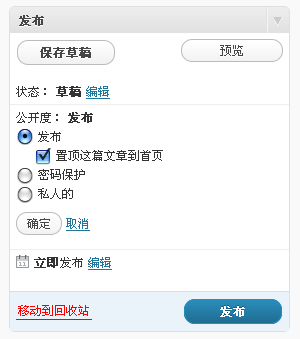
可能是WP故意与大家捉迷藏,把集成的置顶功能隐藏的比较深,有两种方法将文章置顶:
一种,正常编辑文章页面,右侧"公开度"点击编辑就可看到,如下图:
第二种,进入文章快速编辑模式,也是右侧,如下图:
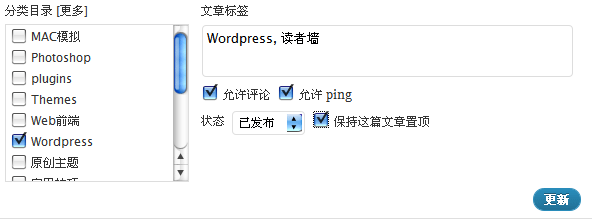
这个置顶功能,用在主题CMS模板的幻灯中,显示指定的文章。
31.如何让"阅读全文"和"更多"按钮,一直显示
这个特效虽然很醒目,但也有可能影响浏览视线,根据喜好可以去掉
首先打开:custom.js找到:
31.如何让"阅读全文"和"更多"按钮,一直显示
这个特效虽然很醒目,但也有可能影响浏览视线,根据喜好可以去掉
首先打开:custom.js找到:
- $(document).ready(function(){
- $('.entry_box').hover(
- function() {
- $(this).find('.archive_more').stop(true,true).fadeIn();
- },
- function() {
- $(this).find('.archive_more').stop(true,true).fadeOut();
- }
- );
- });
- // more
- $(document).ready(function(){
- $('.entry_box_h').hover(
- function() {
- $(this).find('.archive_more').stop(true,true).fadeIn();
- },
- function() {
- $(this).find('.archive_more').stop(true,true).fadeOut();
- }
- );
- });
删除或将其中的四个".archive_more"随便改一个名称
再打开:style.css找到:
- .archive_more {
- float:rightright;
- display:none;
- }
删除其中的display:none;
32.当站点标题中有英文半角字符时,浏览正文时IE状态栏会提示有错误。
解决办法:
打开:single.php找到:
- <a href="#" onclick="copy_code('<?php the_permalink() ?> | <?php bloginfo('name');?>'); return false;"> +复制链接</a>
替换为:
- <a href="#" onclick="copy_code('<?php the_permalink() ?> '); return false;"> +复制链接</a>
33.给主题添加CSS3文字阴影
这个CSS3文字阴影效果,真的很不错,主题之前部分位置已采用,如导航菜单上的文字。可增强文字的清晰度,可惜IE不支持,包括刚发布的IE9 RC,悲哀.....
下面就将这个效果加到所有文字上,很简单。
打开:style.css在:
- body {
- background: #f2f2f2;
- font: 12px 微软雅黑, Verdana, Tahoma, Lucida Grande, Arial, sans-serif;
- color: #000;
- }
中添加:
- text-shadow: 0px 1px 0px #d1d1d1;
其中,#d1d1d1为阴影颜色,可根据喜好自行更改。最终代码:
- body {
- background: #f2f2f2;
- font: 12px 微软雅黑, Verdana, Tahoma, Lucida Grande, Arial, sans-serif;
- color: #000;
- text-shadow: 0px 1px 0px #d1d1d1;
- }
另外在:
- .comment-reply-link {
- font-size:12px;
- color: #fff;
- text-align:center;
- padding: 2px 15px 2px 15px;
- }
加入:
- text-shadow: 0px 1px 0px #000;
34.顶部4个热点文章调用某个分类文章
打开:top_hot_a.php查找:
- meta_key=hot&orderby=rand&showposts=4&caller_get_posts=4
改为:
- cat=10&orderby=rand&showposts=4&caller_get_posts=4
修改数字"10"为调用的分类ID,在主题控制面板顶部热点文章设置中,切换到key模式即可。
顺便解释一下这句代码的含意:
meta_key=hot 调用添加了自定义栏目:hot的日志
cat=10 调用ID为10的分类文章
orderby=rand 随机显示文章
showposts=4 显示4篇文章
caller_get_posts=4 排除4篇置顶文章
35.如何让首页或分类存档页面,显示段落格式
主题采用的中文截断函数,不支持段落格式。不过编辑文章时,可以在下面摘要框内输入文章摘要,这样首页就会显示你输入的有段落格式摘要内容。
36.让主题支持more标签截断
可能是习惯了使用无任何功能的简单主题,也习惯使用more标签手动截断文章,不只一个人问这个问题。
想当年多少人为了这个自动截断伤透脑筋,不过萝卜青菜各有所爱,偏偏有人喜欢手动截断,那就按下面替换一下:
分别打开:blog.php、archive.php、search.php,貌似还有....,不过喜欢用这个方法的童鞋,应该不需要了。
找到:
- <?php if (has_excerpt())
- { ?>
- <?php the_excerpt() ?>
- <?php
- }
- else{
- echo mb_strimwidth(strip_tags(apply_filters('the_content', $post->post_content)), 0, 480,"...");
- }
- ?>
替换为:(这句函数显示文章中图片)
- <?php the_content(); ?>
或者:(这句不显示文章中的图片)
- <?php the_excerpt() ?>
如果缩略图也不要了,那就删除下面的代码:
- <div class="thumbnail_box">
- <?php include('includes/thumbnail.php'); ?>
- <span class="postdate"><?php the_time('Y年m月d日') ?></span>
- </div>
37.点击缩略图没有链接到文章
这是因为你使用了"特色图片功能",2.4版不需要使用该功能,主题会自动获取日志中图片,包括本地上传和外链图片,取消"特色图片"即可。
如果要使用这个方法调用缩略图请参考这篇文章修改:改进HotNews pro2.4缩略图调用方法
38.有人说使用这个模板打开网页有点卡
这个"有点卡",排除主机空间的问题和浏览者网速外,因为主题功能较多,不可能有象功能单一的主题模板那样的加载速度。如果你的机器配置较低,比如只有可怜的256内存,主题集成众多JS特效,你的机器肯定抗不住,会有与玩游戏卡类似的感觉,另外,如果你添加了一些订阅代码和统计代码都会严重影响网页打开速度,因为这些免费的东西不可能有保证,比如我用的站长统计,就经常卡在那不动,不能加载统计代码,造成侧边很长一段时间无法显示。
39.导航菜单文字多了会错位
默认只有用IE浏览器时,超过6个汉字才会错位,解决办法:
在当前主题设置中关闭IE浮雕特效。不过如果导航菜单的项目是一句话,估计还会错位...
40.加快侧边滑动菜单鼠标悬停展开的反映速度
这个仿苹果网站的滑动TAB菜单,默认鼠标悬停反映时间有点长。可以打开:hoveraccordion.js
查找数字:400,适当改小即可。
41.侧边最新评论显示表情
默认侧边这段带头像的最新评论代码,并不具备显示表情的功能,那就改造成一下
打开:r_comments.php找到:
- strip_tags($comment->com_excerpt)
替换为:
- convert_smilies(strip_tags($comment->com_excerpt))
并在style.css样式文件中加入:
- .wp-smiley {
- height:15px !important;
- }
虽然还不太完美,不过可以凑合着用了
42.将CMS模板首页顶部的热门标签替换为分类目录
打开header_h.php,查找:
- <div class="tag_t"><?php wp_tag_cloud('smallest=12&largest=12&orderby=count&unit=px&number=12&order=&exclude&include=');?></div>
替换为:
- <div class="tag_t"><ul><?php wp_list_cats("sort_column=name&hierarchical=0&exclude=1,3,6"); ?></ul></div>
其中:exclude=1,3,6后面的数字是排除的分类ID号,不想显示的分类就把ID添加进去,中间用英文逗号分开。
最后,在style.css中加入样式:
- .tag_t ul li {
- float:right;
- }
————————————以下主要针对HotNews pro2.5版本————————————————
43.排除侧边热门文章中的自动草稿
打开:functions.php
找到:
- // 获得热评文章
- function simple_get_most_viewed($posts_num=10, $days=30){
- global$wpdb;
- $sql = "SELECT ID , post_title , comment_count
- FROM $wpdb->posts
- WHERE post_type = 'post' AND TO_DAYS(now()) - TO_DAYS(post_date) < $days
- ORDER BY comment_count DESC LIMIT 0 , $posts_num ";
- $posts = $wpdb->get_results($sql);
- $output = "";
- foreach ($postsas$post){
- $output .= "\n<li><a href= \"".get_permalink($post->ID)."\" rel=\"bookmark\" title=\"".$post->post_title." (".$post->comment_count."条评论)\" >".cut_str($post->post_title,32)."</a></li>";
- }
- echo$output;
- }
替换为:
- // 获得热评文章
- function simple_get_most_viewed($posts_num=10, $days=30){
- global$wpdb;
- $sql = "SELECT ID , post_title , comment_count
- FROM $wpdb->posts
- WHERE post_type = 'post' AND `post_status` = 'publish' AND TO_DAYS(now()) - TO_DAYS(post_date) < $days
- ORDER BY comment_count DESC LIMIT 0 , $posts_num ";
- $posts = $wpdb->get_results($sql);
- $output = "";
- foreach ($postsas$post){
- $output .= "\n<li><a href= \"".get_permalink($post->ID)."\" rel=\"bookmark\" title=\"".$post->post_title." (".$post->comment_count."条评论)\" >".cut_str($post->post_title,32)."</a></li>";
- }
- echo$output;
- }
其中添加了一句:AND `post_status` = 'publish'
另外,如果你的门有评论的文章较少,可以将其中的数字30(天数),改大一些,否则侧边的滑动菜单中如果不够10篇日志,会有断节现象。
44.去掉主题集成的ajax评论特效。
这个ajax评论特效真的很不错,不过可能会与一些插件JS产生冲突,造成不能留言,可以打开:header.php,找到并删除:
- <?php if ( is_singular() ){ ?>
- <script type="text/javascript" src="<?php bloginfo('template_directory'); ?>/comments-ajax.js"></script>
- <?php } ?>
45.2.5版CMS模版分类列表模块第一篇文章标题文字较多会与分类标签重叠
打开:cms.php,查找:
- <h3><a href="<?php the_permalink() ?>" rel="bookmark" title="详细阅读 <?php the_title_attribute(); ?>"><?php the_title(); ?></a></h3>
替换为:
- <h3><a href="<?php the_permalink() ?>" rel="bookmark" title="详细阅读 <?php the_title_attribute(); ?>"><?php echo cut_str($post->post_title,60); ?></a></h3>
其中数字:60,可根据情况适当修改
46.顶部日期在IE9下显示为111解决办法
打开:includes\time.php,查找:
- year =(today.getYear());
替换为:
- year =(today.getFullYear());
47.找回主题的彩色标签
新版中去掉了彩色标签,可以将下面的代码加到主题functions.php,中(可参考一下2.4版的functions.php文件):
- //彩色标签云
- function colorCloud($text) {
- $text = preg_replace_callback('|<a (.+?)>|i', 'colorCloudCallback', $text);
- return$text;
- }
- function colorCloudCallback($matches) {
- $text = $matches[1];
- $color = dechex(rand(0,16777215));
- $pattern = '/style=(\'|\")(.*)(\'|\")/i';
- $text = preg_replace($pattern, "style=\"color:#{$color};$2;\"", $text);
- return"<a $text>";
- }
- add_filter('wp_tag_cloud', 'colorCloud', 1);
48.有密码保护的文章,会看见部分内容
这个问题是由于主题用的中文截断函数,非WP标准函数造成的。这个问题其实早就考虑到了。解决办法:
为有密码保护的文章,添加自定义栏目,名称:password_hint,值:输入一句提示文字即可。
49.优化一下仿苹果滑动TAB菜单
有时因为网速度慢,会造成TAB菜单最下面的项目加载延迟背景图片不显示,可以加上一句样式,一定程度上解决了这个问题。
- #hotarticles ,#advice {
- display: none;
- }
50.两处较严重的错误修正
这是在制作2.6版时发现的较严重的错误(当你看到这条时主题已升级至2.51,两处错误被清除)
第一个,打开所有header开头的模板文件,上面第三行
- <head profile="http://gmpg.org/xfn/11">
替换为:
- <html xmlns="http://www.w3.org/1999/xhtml" <?php language_attributes() ?>>
- <head>
原来的缺少语言判断函数,部分浏览器可能会出现样式错误
第二个,2.5版ajax评论JS错误
由于在测试其它功能时删除了一个标签,忘记还原,在提交评论后会提示网页有错误
打开:comments.php找到:
- <input class="submit" name="submit" type="submit" tabindex="5" value="提交留言"/>
替换为:
- <input class="submit" name="submit" type="submit" id="submit" tabindex="5" value="提交留言" />
————————————以下主要针对HotNews pro2.6版本————————————————
51.侧边自定义小工具推荐文章,显示添加自定义栏目的文章。
打开widget\s_cat.php,找到&cat改为&meta_key,之后在主题控制面板中输入分类ID的位置直接输入一个自定义栏目的名称,比如2.5版的related即可。
52.文章属于多个分类时不显示分类小图标
从2.5以后换了之前用的分类小图标代码,不过目前这段代码,当文章属于多个分类时不显示小图标,虽然一直不明白为什么那多人喜欢把一篇日志要划归到多个分类下,想加个判断,只取一个分类的名称,无奈水平有限,网上搜索了一下,I'M .K' 已给出了修改后的代码。
- <?php if (get_option('swt_ico') == 'Display') { ?>
- <div class="cat_ico">
- <a href="<?php bloginfo('url'); ?>/category/<?php $catArray = get_the_category(); $cat=$catArray[array_rand($catArray,1)]; echo $cat->category_nicename;?>" title="<?php echo $cat->cat_name;?>">
- <img src="<?php bloginfo('template_url');?>/images/caticon/<?echo $cat->category_nicename; ?>.gif" />
- </a>
- </div>
- <?php } else { } ?>
用上面的代码替换cat_ico.php中所有内容,这段修改后的代码竟然还能实现随机显示多分类小图标效果,不错。
53.之前使用过本主题的用户在安装新版后,在分类归档页面下面可能会提示错误。
这是由于在升级主题时原版本的多余代码未清理干净造成的,可以打开archive.php,在下面第87行开始,查找并删除下面两句代码之间的内容即可:
- <!-- end: navigation -->
之间的代码全部删除
- <!-- end: bottom -->
54.去掉集成的ajax评论
估计很多新手都会认为留言发表后还能编辑修改,是WP本身自带的。这里可能明确地告诉你这个功能叫ajax评论,WP本身并无此功能,集成后只要不刷新页面,发表的留言可以重新编辑,这是网上高人的杰作,也有类似功能的插件。不过集成ajax评论功能后,会感觉发表评论时很慢,因为需要加载JS文件,运行函数判断,如果网络状况不好,确实感觉很慢,鱼和熊掌不可兼得,那就去掉这个比较人性化的功能。
打开主题的header.php,查找:
估计很多新手都会认为留言发表后还能编辑修改,是WP本身自带的。这里可能明确地告诉你这个功能叫ajax评论,WP本身并无此功能,集成后只要不刷新页面,发表的留言可以重新编辑,这是网上高人的杰作,也有类似功能的插件。不过集成ajax评论功能后,会感觉发表评论时很慢,因为需要加载JS文件,运行函数判断,如果网络状况不好,确实感觉很慢,鱼和熊掌不可兼得,那就去掉这个比较人性化的功能。
打开主题的header.php,查找:
- <?php if (function_exists('wp_enqueue_script') && function_exists('is_singular')) : ?>
- <script type="text/javascript" src="<?php bloginfo('stylesheet_directory'); ?>/js/jquery.min.js" ></script>
- <?php wp_head(); ?>
- <?php if ( is_singular() ){ ?>
- <script type="text/javascript" src="<?php bloginfo('template_directory'); ?>/comments-ajax.js"></script>
- <script type="text/javascript" src="<?php bloginfo('template_directory'); ?>/js/reply.js"></script>
- <?php } ?>
- <?php endif; ?>
替换为:
- <?php if ( is_singular() ) wp_enqueue_script( 'comment-reply' ); ?>
- <?php wp_head(); ?>
55.顶部导航菜单与LOGO位置调换
经常有人问这个问题,其实对折腾过主题的童鞋,是件很简单的事,打开主题所有以header开头的模板文件
找到:
找到:
- <div id="top">
- <div id='topnav'>
- <div class="left_top ">
- <div class="home"><a href="<?php echo bloginfo('url'); ?>" title="首 页" class="home"></a></div>
- <?php wp_nav_menu( array( 'theme_location' => 'header-menu' ) ); ?>
- </div>
- <!-- end: left_top -->
- <div id="searchbar">
- <form action="<?php echo get_option('swt_search_link'); ?>" id="cse-search-box">
- <div>
- <input type="hidden" name="cx" value="<?php echo get_option('swt_search_ID'); ?>" />
- <input type="hidden" name="cof" value="FORID:10" />
- <input type="text" onclick="this.value='';" name="q" id="q" class="swap_value" />
- <input type="image" src="<?php bloginfo('template_directory'); ?>/images/go.gif" id="go" alt="Search" title="搜索" />
- </div>
- </form>
- </div>
- <!-- end: searchbar -->
- </div>
- <!-- end: topnav -->
- </div>
- <!-- end: top -->
整体移动到注释:
- <!-- end: header -->
下面
56.菜单自定义链接,在新窗口或标签中打开
此问题与主题无任何关系,乃是WP基本功能。方法:
编辑打开添加的自定义链接菜单项目,在属性面板中有"链接目示"一项,如果没有"链接目标"这一项,可以打开右上"显示选项"在显示菜单高级属性中把所有都勾选。
57.删除WordPress评论中的自动链接
- remove_filter('comment_text', 'make_clickable', 9);
58.解决分主机空间启用顶部计数器后部错误提示
这个访客计数器,并不是真正的流量统计,只是一段简单的PHP函数,记录的是页面的刷新次数,有些主机空间有功能限制,特别是一些免费主机更是如此,启用后会提示错误,如果你非得要使用这个蛋疼的功能,可以打开:HotNewspro\includes目录的counter.php用下面的代码替换全部。
- <?php if (get_option('swt_count') == 'Display') { ?>
- <?php
- function MyCounter() {
- $counterFile="wp-content/themes/count.dat";
- if (!file_exists($counterFile)) {
- if (!file_exists(dirname($counterFile))) {
- mkdir(dirname($counterFile), 0700);
- }
- $fp = fopen($counterFile,"w");
- fwrite($fp,0);
- fclose($fp);
- }
- $fp = fopen($counterFile,"r");
- $num = fgets($fp);
- fclose($fp);
- $num += 1;
- print "<font color=black>$num</font>";
- $fp = fopen($counterFile,"w");
- fwrite($fp,$num);
- fclose($fp);
- }
- echo("您是第 ");
- print mycounter();
- echo(" 位访客");
- ?>
- <?php } else { } ?>
另外这段代码当博客访问量较高,有时会自动重新计数,大概是因为并发量大读取错误。
以上修正代码由Crazy童鞋提供
待续.....
 YouTube has launched a new initiative called


