1 / 3
Caption Text
2 / 3
Caption Two
3 / 3
Caption Three margin testing

Tuesday, March 15, 2011

Droid 2 In Dock Mode

http://how2droid2.blogspot.com/2010/11/droid-2-in-dock-mode.html

Okay, so now you have a multimedia dock for your Droid 2. (Check out last week's post for the dock review.) Now what? Today, I will go through what happens when your phone is in dock mode.

The first thing you will notice when you put your phone into the dock is that you will see the main dockscreen instead of the usual homescreen.

Homescreen

Dockscreen

The main dockscreen is divided into four different areas:
  • Main Dockscreen
  • Dock Status Bar
  • Dock Settings
  • Dock Widgets And Application Shortcuts
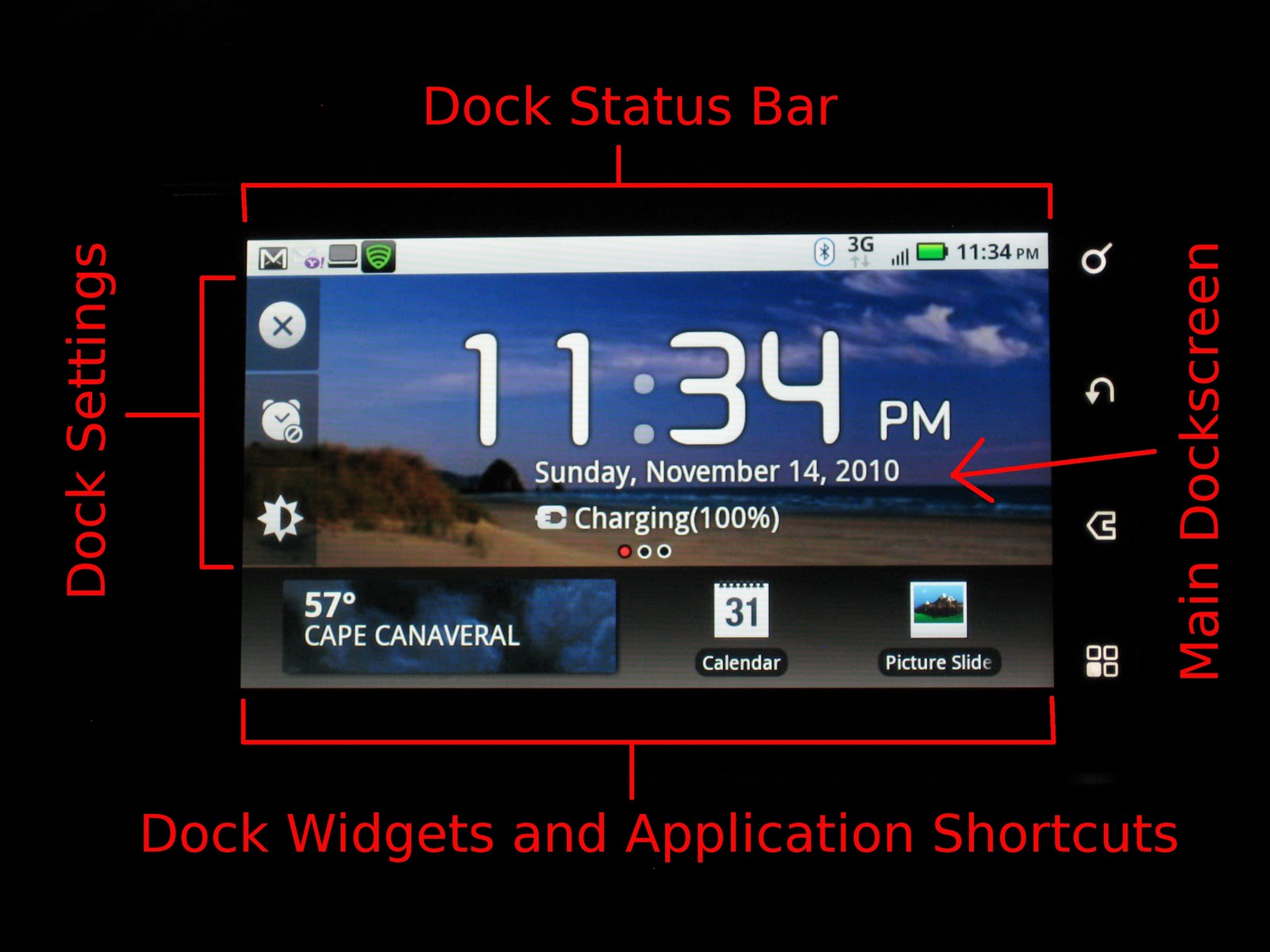
Four Areas of Dockscreen


Main Dockscreen
In the center of your dockscreen is the current time and date along with the battery charge, and three dots which indicate which of the three dock widget screens you are in. Your wallpaper for the dockscreen is the same as the homescreen.


Dock Status Bar
At the top is the status bar. The status bar is the same whether your phone is in or out of the dock and shows email notifications, battery charge, signal strength, etc. And just like on the homescreen, you can pull down the status bar to get more info.


Dock Settings
On the left side of the screen are dock settings icons. Touching the top setting icon switches the phone from the dockscreen to the homescreen. To return to the dockscreen, either touch the "home" button, or pull down the status bar at the top and touch the notification that says "connected to multimedia station" . The middle icon is for the alarm clock and timer settings. This is where can set an alarm or timer. The bottom icon is the brightness setting. You can switch between a bright and a dim mode. Bright mode lets you easily see the display during the day or in a well lit room. Dim mode creates just enough light in the dark so you can see the display but not so much that it will keep you awake if you have your dock by your bed.

Notification For Returning To Dockscreen

Alarm Clock Settings

Dim Mode

Dock Widgets And Application Shortcuts
On the bottom part of the dockscreen is the area for the dock widgets and application shortcuts. The default widgets that appear are the weather, play all (for music), and picture slideshow widgets. You can scroll through additional dock widget screens to both the left and right by swiping your finger along the widgets. For some reason, all of the widgets that are available on your homescreen aren't available in the dockscreen. Dock widgets include:
  • Airplane Mode Toggle
  • Bluetooth Toggle
  • Calendar
  • Contacts
  • DLNA
  • Gallery
  • GPS toggle
  • Music
  • Picture Slideshow
  • Play All (music)
  • Weather
  • Wifi Toggle
  • Youtube
Dock Widgets and Application Shortcuts Screen

Miscellaneous
The built-in "menu", "home", "back", and "search" keys perform the same functions whether your phone is in the dock or not.


Next Time: I'll cover some apps that are helpful when your phone is in the dock.

Monday, March 14, 2011

Download free Skype app for Android at Freeware Lovers

http://www.freewarelovers.com/android/app/skype

(Installed, HL)

General

Developer: Skype

Category: Communications

Latest version: 1.0.0.831

Total versions: 4

Submitted: 6 Nov 2010

Updated: 14 Dec 2010

Description

Skype app for Android allows you:

- Free* Skype-to-Skype calls over 3G or WiFi and chat with one or many friends at the same time
- Low global rates to mobiles and landlines, at home or abroad

*Data plan or WiFi connection required (calling in U.S. - WiFi only).

Find Friend feature allows you to easily find your friends and add them to the contact list. You can sync your Skype contacts with Android contacts if you wish.

Some handsets may not be currently supported. To run Skype on a Samsung Galaxy S you need Android 2.2.

Note: Skype is not a replacement for your telephone and cannot be used for emergency calling. Also be aware that if you are roaming on international networks, this may result in additional charges to your phone bill.

Download

Skype 1.0.0.831 seem to be the latest available version. Below you can find file(s) assigned to this version:

Sunday, March 13, 2011

RE文件管理器 Root Explorer v2.13.4 完全汉化版

http://bbs.gfan.com/viewthread.php?tid=399599&extra=&highlight=root%2Bexpl&page=1
- 机锋网汉化软件 - Android安卓中文论坛 机锋网|机锋市场|安致|安卓|ROM|刷机|安卓市场|安智市场|应用汇 - Powered by Discuz!

(Installed it as my first app on ME722 after rooting successfully, HL)

  中文译名:RE管理器
  英文原名:Root Explorer
  发布版本:v2.13.1
  软件类型:系统工具
  出品厂商:Speed Software Ltd
  资费说明:$3.91
  发布日期:2010-12-17
  汉化作者:GCA机锋汉化组 jeff_ding
  汉化版本:付费版/破解版
  测试平台:Android 2.2 480x800 HTC G7
--------------------------------------------------------------------------------------
【软件简介】
--------------------------------------------------------------------------------------
Root Explorer是一款高权限的文件管理器,需要访问ROOT的权限。
新建文件夹,查看/编辑文件,软件安装,RootExplorer具备普通文件管理器的各项基本功能,另外还添加了搜索功能,在手机上找东西变得更加方便。此外,RootExplorer 最大的特点在于它能够删除手机中自带的应用程序,如GOOGLEMAP,CONTACTS,MARKET,GTALK....你想怎么删就怎么删,哈哈,别把机器删的启动不了啦:)

--------------------------------------------------------------------------------------
【汉化图示】
--------------------------------------------------------------------------------------
re.jpg

--------------------------------------------------------------------------------------
【汉化说明】
--------------------------------------------------------------------------------------
xml 汉化,smali 汉化

--------------------------------------------------------------------------------------
【软件下载】
--------------------------------------------------------------------------------------
HA-20110209-RootExplorer_v2.13.4-GCA.apk (194.78 KB)

Milestone 2 /里程碑2 ME722 国行ROM成功ROOT

http://bbs.gfan.com/android-517856-1-1.html
(附下载地址)求加亮*** - MOTO Milestone 2(ME722)/Droid 2(Global) 论坛 - Android安卓中文论坛 机锋网|机锋市场|安致|安卓|ROM|刷机|安卓市场|安智市场|应用汇 - Powered by Discuz!

(根据我的实际操作,对本文做了一些修改,HL)

写在最前:国行ROM的版本为2.2.1,目前的Z4ROOT的程序均不能成功ROOT。故参考Nexus One 的ROOT方法,使用SuperOneClick进行ROOT,已成功。

Root工具:SuperOneClick 1.4稳定版:
115网盘下载地址为:http://u.115.com/file/f0a1aa2136

准备工作:ROOT有风险,请备份关键性资料以免遗失;ROOT期间关闭电脑防火墙以免除不必要的麻烦。

使用方法:
0. Turn off firewall and antivirus, install Motorola USB driver on computer
1. 连接USB电脑,在手机上打开USB调试模式—(设置-应用程式-开发-USB调试处打钩)
2. 运行SuperOneClick.exe
3. 点击"ROOT" (见下面的HL附过程)
4. 成功并重启手机 (断开USB连接,关机重开)
5. 验证ROOT权限是否已经获取成功,安装ROOT Explorer,运行。弹出授权提示即ROOT成功

注意:1.如果在ROOT期间出现wait for device ,解决办法有以下两种:
a.在保持USB连接的情况下,开/关"USB调试模式"直至成功
b.在计算机-设备管理器里面,看一下是否有黄色的感叹号为"MTP USB"?!
有的话请使用"开始-程式"里的"Motorola Driver Installer.exe",
在里面Update Drivers;
没有的话请扫描硬件改动直至成功
2.切记!ROOT成功后请先重启,我就是忘记重启多浪费了2个小时,悲剧啊!!

最后,祝大家早点 ROOT,我删程序去了!国行ROM删了垃圾程序后,飞一般的快啊!

几个有用的工具
文件管理——Root Explorer v2.13.3
系统程序卸载器 SystemApp Remover v3.5 汉化版
代替RE管理器!电脑上运行的ROOT文件管理器!

HL 附过程:

Killing ADB Server...

OK

Starting ADB Server...
* daemon not running. starting it now on port 5037 *
* daemon started successfully *

OK

Waiting for device...

OK

Pushing rageagainstthecage...
5 KB/s (585731 bytes in 99.293s)

OK

chmod rageagainstthecage...

OK

Running rageagainstthecage...
OK

Killing ADB Server...
* server not running *

OK

Starting ADB Server...
* daemon not running. starting it now on port 5037 *
* daemon started successfully *

OK

Waiting for device...

OK

Running rageagainstthecage...
ROOTED

Getting mount path...
/dev/block/mmcblk1p21
OK

Remounting system with read-write access...

OK

Pushing su...
1 KB/s (26264 bytes in 15.032s)

OK

Pushing superuser.apk...
1 KB/s (196521 bytes in 106.514s)

OK

chmod su...

OK

Remounting system with read-only access...

OK
-------
popup a smaill window, said:
Device is rooted


Saturday, March 12, 2011

MOTO Milestone 2 (ME722) / Droid 2 (Global) 系统备份

http://bbs.gfan.com/android-565269-1-1.html
me722 钛备份&求助 - MOTO Milestone 2(ME722)/Droid 2(Global) 论坛 - Android安卓中文论坛 机锋网|机锋市场|安致|安卓|ROM|刷机|安卓市场|安智市场|应用汇 - Powered by Discuz!

我基本上自己手工备份几个目录
/system/app/ (rw-r--r--),目录本身属性:rwxr-xr-x
/data/app/ (rw-r--r--),目录本身属性:rwxrwx--x
/data/data/ (rwxr-x--x),目录本身属性:rwxrwx--x

恢复的时候给复制回去然后把文件属性改回去。

Milestone2获取ROOT权限教程

http://www.gfan.com/market/rom/201009213818.html
独家首发 摩托里程碑2来袭GSM/WCDMA版 Milestone2获取ROOT权限教程 - 机锋网 GFan.com - 安致(安卓)Android智能手机中文站

  由美国运营商定制,基于CDMA网络的摩托罗拉 Droid2上市已经有一段时间了,但是GSM/WCDMA版的Milestone2虽然不一些消息和图片放出,但是Milestone2的确切上市日期还没有公布。上周我们拿到了一台Milestone2样机。虽然机身为Vodafone定制版,但是机器内部已经搭载 Android 2.2 联通定制版系统。虽然Motorola Milestone之后的机器,Bootloader都加上了锁。导致无法运行自制内核,但是虽然刷机受限,ROOT权限依然是我们非常关注的。目前,机锋网已成功获取GSM/WCMDA 版 Milestone2 ROOT权限。教程如下

  什么是ROOT权限?ROOT后可以做什么?为什么要ROOT?如果你有这些疑问,请先来这里补补课:http://www.gfan.com/glab/faq/201008092307.html

Android安卓Moto里程碑2Milestone2ROOT教程

  第一步、首先,安装驱动

  32位操作系统驱动 << 点击下载安装

  64位操作系统驱动 << 点击下载安装

  第二步、通过USB连接线,将手机与电脑连接起来,打开手机主界面

Android安卓Moto里程碑2Milestone2ROOT教程 Android安卓Moto里程碑2Milestone2ROOT教程

  点击菜单,选择设置,找到应用程序,选择开发

Android安卓Moto里程碑2Milestone2ROOT教程 Android安卓Moto里程碑2Milestone2ROOT教程

  将USB 调试打勾 ,通知栏出现已连接USB调试,此时已安装过Moto驱动的电脑会开始识别手机

Android安卓Moto里程碑2Milestone2ROOT教程 Android安卓Moto里程碑2Milestone2ROOT教程

  下拉通知栏,点击USB连接,将USB连接设置选择为门户与工具(Motorola Phone Portal),确定

  第三步、下载获取ROOT的工具,解压到电脑

  SuperOneClick 1.4稳定版 << 点击下载

  运行SuperOneClick.exe, 点击“ROOT”

  第四步、验证ROOT权限是否已经获取成功,安装ROOT Explorer,运行。弹出授权提示(第一张图)即ROOT成功。


钛金备份:Titanium Backup 3.7.3.2 捐赠完全版

http://bbs.gfan.com/viewthread.php?tid=845752&highlight=%E9%92%9B
 - Android 软件下载 - Android安卓中文论坛 机锋网|机锋市场|安致|安卓|ROM|刷机|安卓市场|安智市场|应用汇 - Powered by Discuz!

钛金备份Titanium Backup是目前最为强悍的程序和系统备份工具,需ROOT权限运行。
免费版功能:7 P9 j& `' O) A9 g
* 无时间限制1 o3 U2 F; @% X0 ^1 u) u, ]8 `$ Y/ a
* 快速加载程序列表(约300个程序/秒)
* 按名称/最后备份/备份频率排序
* 按名称/类型/状态/程序标签过滤程序(在批量操作中同样有效)
* 备份/恢复常规程序和设置
* 备份/恢复受保护程序和设置' D2 v: T. G: }, S) N+ f! `
* 备份/恢复系统设置(包括Wi-Fi接入点列表)
* 恢复程序时同时恢复电子市场链接
* 零单击后台批量备份# V' u3 }8 r) a/ G+ V* z7 \, h
* 交互式批量恢复
* 多种批量方案(如:距最后备份超过N天后)
* 零单击程序卸载
* 零单击系统程序卸载2 L. q$ K- V) G3 ~0 s# V
* 桌面小部件
* 每周或每半月计划备份(测试)& x6 r. V8 S: L% U* n2 A9 U& X
捐赠版额外功能:  `) |% D, M8 Y( }  V$ C# {6 J
* 附加上您的名字
* 每个程序多重备份(可以选择历史长度)* e9 y* g5 E9 D3 _' G
* 零单击后台批量恢复
* 全部备份批量校验
* 极快的HyperShell5 b7 N3 a5 a6 k/ V! Z) n/ @7 O+ E
* 市场医生可还原任意丢失的电子市场链接(仅支持备份过链接的程序)0 T9 n1 t" ?( W: a  |
* 程序冻结可以无需卸载便禁用程序(并使它不可见)
* 无限制的、独立的计划备份
* 同步自定义标签到SD卡和Dropbox
v3.7.3.2:
- Fixed FC when launching scheduled backups on Android versions earlier than 2.1.
8.png 
 钛金备份_Titanium Backup_3.7.3.2捐赠完全版.apk (1.89 MB)

----------------------
钛备份Titanium Backup是目前最为强悍的程序和系统备份工具,需ROOT权限运行。

免费版功能
================================================================
* 无时间限制
* 快速加载程序列表(约300个程序/秒)
* 按名称/最后备份/备份频率排序
* 按名称/类型/状态/程序标签过滤程序(在批量操作中同样有效)
* 备份/恢复常规程序和设置
* 备份/恢复受保护程序和设置
* 备份/恢复系统设置(包括Wi-Fi接入点列表)
* 恢复程序时同时恢复电子市场链接
* 零单击后台批量备份
* 交互式批量恢复
* 多种批量方案(如:距最后备份超过N天后)
* 零单击程序卸载
* 零单击系统程序卸载
* 桌面小部件
* 每周或每半月计划备份(测试)

捐赠版附加功能
================================================================
* 附加上您的名字
* 每个程序多重备份(可以选择历史长度)
* 零单击后台批量恢复
* 全部备份批量校验
* 极快的HyperShell
* 市场医生可还原任意丢失的电子市场链接(仅支持备份过链接的程序)
* 程序冻结可以无需卸载便禁用程序(并使它不可见)
* 无限制的、独立的计划备份
* 同步自定义标签到SD卡和Dropbox

主要更新说明
================================================================
v3.7.3
1、优化Dropbox代码
2、可显示未安装程序的图标
3、增加匈牙利语
4、如果计划任务操作在屏幕关闭时运行,则跳过倒计时


v3.7.2
1、增加巴西葡萄牙语翻译
2、增加土耳其语翻译
3、增加剩余空间估算功能
4、升级钛备份后自动显示更新日志(可以在设置中取消)
5、修复大多数用户无法在设置中更改通知图标主题的问题

v3.6.8
- 增加了芬兰语。
- 增加了应用程序的能力进行排序的数据修改日期。
- 增加了可选的确认时,未安装一个应用程序手动。默认情况下,它可以改变界面的设置。
- 自动刷新应用程序列表,如果一个应用程序的安装/卸载/升级/降级的钛备份之外。
- 显示apk文件路径时,"当前版本"在一个应用程序的属性点击。

v3.6.7.1
- 支持电子市场2.2.11及以上版本的市场链接
- 增加新的WakeLock设置以保证在屏幕关闭时运行
- 修复Dropbox服务器不可用时FC的问题
- 更新翻译


v3.6.7
- 可调整同步(备份)至Dropbox网盘的历史备份范围;
- 修复长期存在的屏幕旋转的问题;
- 通知栏可显示进度"正在进行";
- 修复某些ROM上检测App2SD安装路径出现的问题;
- 小幅调整界面。


v3.6.6.3
- 修复在某些ROM上App2SD容量计算错误的问题;
- 修复在三星的ROM上创建update.zip文件的问题(将设置中的"程序安装器模式"设为"自动,间接");
- 新增乌克兰语言。


截图
================================================================


Featured Post

Windows和Ubuntu双系统完全独立的安装方法

http://www.ubuntuhome.com/windows-and-ubuntu-install.html  | Ubuntu Home Posted by Snow on 2012/06/25 安装Windows和Ubuntu双系统时,很多人喜欢先安装windows,然...